17 Model deployment
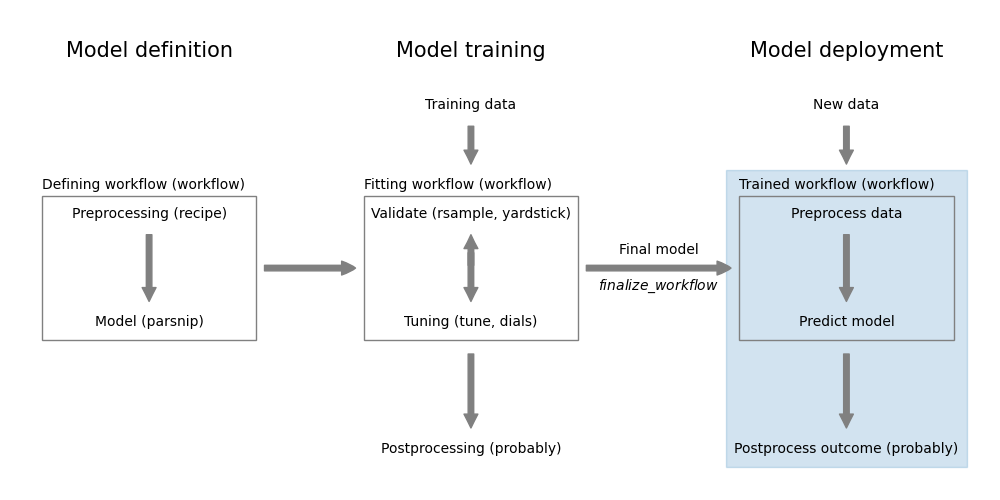
Building and training a model is only the first step in the lifecycle of a machine learning application. The next step is to deploy the model into production. This is the process of integrating the model into an existing production environment, so that it can be used to make predictions on new data.
There are many different ways of deploying a model and it very much depends on the infrastructure of your organization.
17.1 Model packaging and infrastructure
Probably the most important aspect of model deployment is to ensure that the model can be easily deployed and maintained in production. Using containers (e.g., Docker) can help to package the model with its dependencies and ensure consistency across environments.
Once you have a containerized model, you can easily deploy it on the most appropriate hardware. Try to use configuration tools like Kubernetes to manage the deployment and scaling of your model. This allows you to easily scale up or down based on demand and ensures that your model is always available to users. It also simplifies the process of updating the model.
An interesting approach to model packaging is to convert the model into the ONNX format (Open Neural Network Exchange). ONNX is an open format for representing machine learning models. It allows you to describe models in a common format that can be deployed on various platforms. You can for example load a model in ONNX format into the browser and access it easily from a web application. While there is basic support for ONNX in R, it is easier to develop the model in Python using scikit-learn and then convert it to ONNX format using the skl2onnx package.
17.2 Deployment Strategies
Consider if your model needs to provide predictions in real-time or if it can be used in batch mode. Real-time deployment requires the model to be available via an API and to provide predictions with low latency. Batch deployment, on the other hand, allows for more complex models and longer processing times, as predictions are made on a scheduled basis.
17.3 Monitoring and maintenance (post-deployment)
Once the model is deployed, the work is not over. You need to monitor the model’s performance in production and maintain it over time. If new data becomes available, you may need to retrain the model to ensure that it continues to perform well.
Aim to continuously record performance metrics and monitor model degradation. The best way to do this is to setup an automated pipeline that retrains the model continuously and deploys the new model whenever it is beneficial.
17.4 R: the vetiver package
The vetiver package provides basic functionality to
- version and publish models
- deploy models into production
- monitor models in production
The documentation for vetiver takes you through the steps of deploying a model into production. You can find the documentation at https://vetiver.rstudio.com/.
To learn more about deploying models, look for resources on MLOps.